API Overview
The VoltAgent Core API provides a programmatic interface to manage and interact with your VoltAgents. It allows you to list agents, generate text or structured object responses, manage agent history, check for updates, and more.
The API is built using Hono, a fast and lightweight web framework for Node.js and other JavaScript runtimes.
Getting Started
The Core API server is typically started as part of your application when you initialize VoltAgent. By default, it tries to run on port 3141, but may use other ports (like 4310, 1337) if the default is unavailable. Check your console output when starting your application to see the exact URL.
# Example console output
$ node your-app.js

  ══════════════════════════════════════════════════
    VOLTAGENT SERVER STARTED SUCCESSFULLY
  ══════════════════════════════════════════════════
    ✓ HTTP Server:  http://localhost:3141
    ✓ Swagger UI:   http://localhost:3141/ui

    Developer Console:    https://console.voltagent.dev
  ══════════════════════════════════════════════════
Interactive API Documentation (Swagger UI)
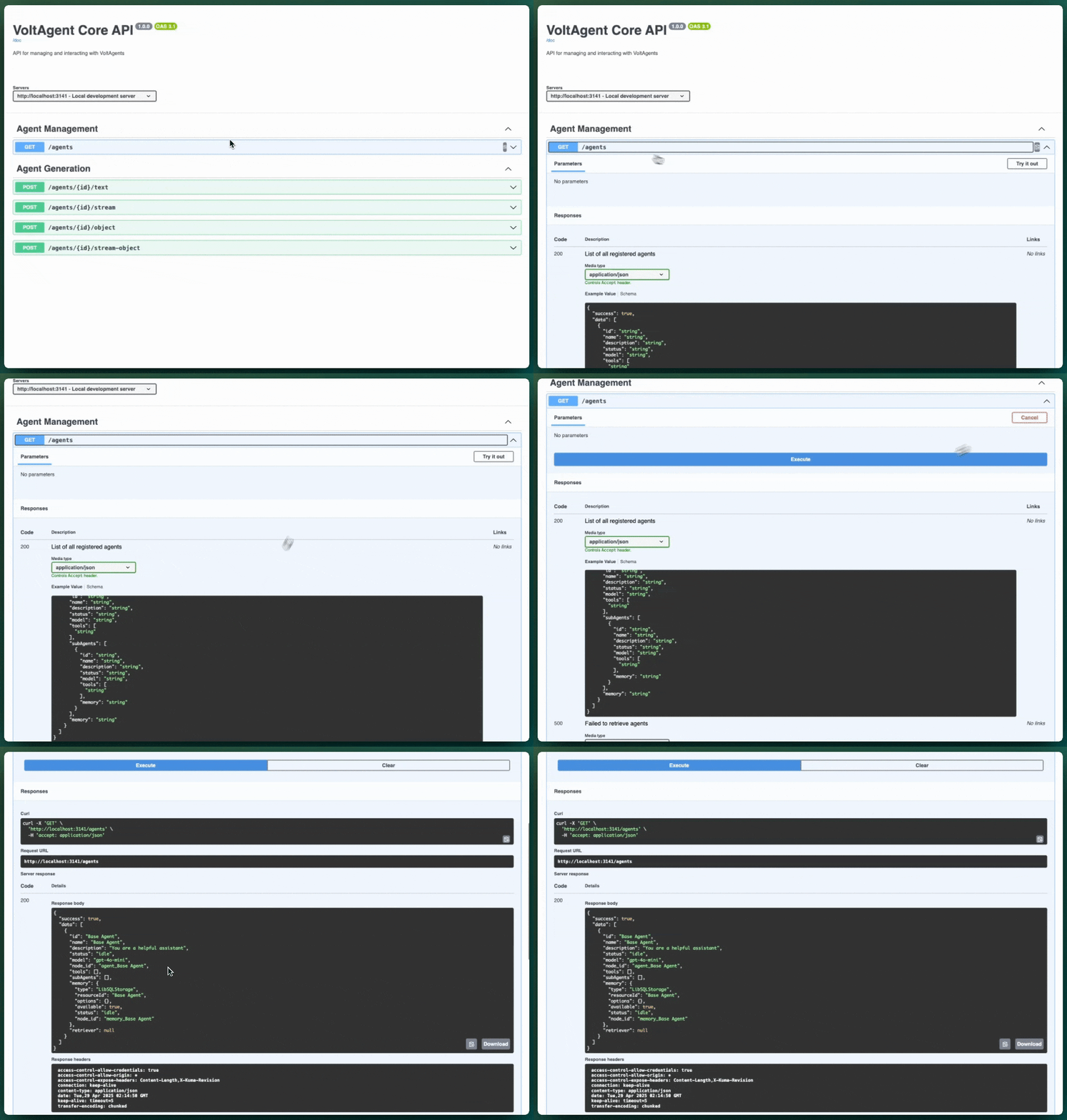
To make exploring and interacting with the API easier, we provide interactive documentation using Swagger UI.
- Access: Navigate to
/uion your running API server (e.g.,http://localhost:3141/ui). - Features:
- Lists all available API endpoints grouped by tags (e.g., "Agent Generation", "Agent Management").
- Shows details for each endpoint: HTTP method, path, parameters, request body structure, and possible responses.
- Provides example values and schemas.
- Allows you to execute API calls directly from your browser ("Try it out" button) and see the results.
This is the recommended way to explore the API's capabilities.
Links to the Swagger UI (/ui) is also conveniently available on the API server's root page (/) and printed in the console logs when the server starts.
OpenAPI Specification
For developers needing the raw API specification for code generation or other tooling, the OpenAPI 3.1 specification is available in JSON format.
- Access: Navigate to
/docon your running API server (e.g.,http://localhost:3141/doc).
Key Endpoints (via Swagger UI)
While the Swagger UI (/ui) provides the most comprehensive details, here's a brief overview of the main functionalities documented:
GET /agents: Lists all agents currently registered with theAgentRegistry.POST /agents/{id}/text: Generates a plain text response from the specified agent based on the input prompt and options.POST /agents/{id}/stream: Streams a text response chunk by chunk using Server-Sent Events (SSE).POST /agents/{id}/object: Generates a structured JSON object response from the agent, guided by a provided schema.POST /agents/{id}/stream-object: Streams parts of a structured JSON object response using SSE.- (Other endpoints): Explore
/uifor details on history, tool execution, update checks, etc.
Please note that while the API documentation for /object and /stream-object specifies that the schema parameter should be a standard JSON Schema object, the current backend implementation (Agent.generateObject, Agent.streamObject) still expects a Zod schema instance.
Sending a JSON Schema object via the API will currently result in a runtime error on the backend. This is a known issue tracked for a future backend update. Until then, generating objects via the raw API requires careful handling or using the agent directly within your TypeScript code where you can pass a Zod schema.
Authentication
Currently, the Core API does not implement built-in authentication routes. Ensure that your API server is deployed in a secure environment or protected by appropriate network-level security (e.g., firewall rules, reverse proxy authentication) if exposing it outside your local machine.
Basic Example (Using cURL)
You can quickly test the API using curl.
List all agents:
curl http://localhost:3141/agents
Generate text:
curl -X POST http://localhost:3141/agents/your-agent-id/text \
     -H "Content-Type: application/json" \
     -d '{ "input": "Tell me a short story about a robot learning to paint." }'
(Replace your-agent-id with the actual ID of one of your agents)
Explore the Swagger UI at /ui for detailed information on all endpoints, parameters, and schemas!